This is not a rumor, it's a done deal. The two 800 pound gorillas of the Colour Management market have got married. The marriage ceremony is valued at $280 Million. Color is serious business nowadays.
Here is the Gretag-side link to this announcement and here is the Xrite-side page .
The CEO of the merged company should first be the present CEO of XRITE, Mr. Michael Ferrara. The present CEO of GMB, Mr. Tom Vacchiano should replace him within 18 months, according to info which I was given. Mary Chowning of Xrite will be CFO, Francis Lamy of GMB CTO. The new HQ will be located in Grandville, Michigan, not Regensdorf. It would seem that digital imaging products rather than industrial color is the center of gravity of the new company.
I knew that Xrite was cash-rich. I didn't know they were that rich.
Having observed -on previous occasions- the fanatical cost-cutting that accompanies these US-driven mergers, I would guess that there will soon be a bunch of color marketing execs and even a few color-scientists looking for work. Not to speak of manufacturing . Maybe some of these idled guys and gals will set up the much needed competition to the newborn giant.
However, there is also the possibility that the new management will redirect the freed R&D and marketing resources to create the cheaper, simpler colour management products that the desktop publishing and photo market really needs. I certainly hope they will do this.
On a more serious note, I think that melding Xrite's excellent design for usability with Gretag's measurement precision will be good for existing users in the short term. Both companies have a good rep with users and good products.
Edmund
Tuesday, January 31, 2006


Monday, January 16, 2006
Finally Here! The Calibrator they might give away: Pantone Huey
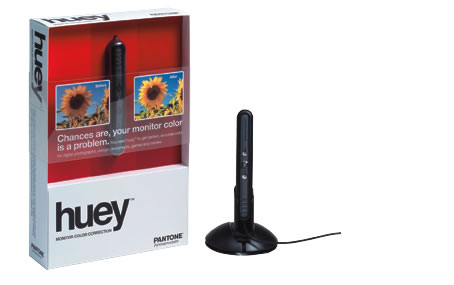
My regular readers will remember that I predicted a crash in monitor-calibrator prices as Windows Vista looms on the horizon - looks like I was right, even sooner than I expected. Entry-level monitor calibrator prices are diving.
The favorite party favor in Color Management circles should soon be the Pantone Huey device - with its $89 list price now, I expect it to be retailing below $50 when Vista hits the streets. The Huey is an OEM product from Gretag, if my info is correct, and this means swiss-designed hardware, and good quality control.
The Huey adds an interesting twist to calibration, as the sensor sits next to your monitor and continually feeds real information about ambient lighting to the computer. With Vista's measurement-based WCS capablities, this could mean that color is readjusted to match not only the ambient illumination intensity but also the fluctuation of color temperature with varying daylight or mixed lighting.
Of course, we can expect Gretag Macbeth to release a low-priced product of their own soon, before the Huey knocks the bottom out of the i1Display sales in the photo channel; also, I wonder how they're feeling at ColorVision, the company that makes the Spyder, the moderate-cost and moderately precise calibration product previously marketed by Pantone. As for Xrite, well guys looks like youre gonna have to lower prices too, but at least no one has ever complained about your product's quality !
Last, not least, about my tag-line: I would expect the Huey to be a favorite "bonus" item soon in the channel with Photoshop or Epson printer bundles, and hopefully a few screen makers will finally see the light and bundle calibrators with displays...
Friday, January 13, 2006
Nec Spectraview 2180WG non-uniformity correction
If you have $6K to burn you can go out and buy a wide gamut Nec Spectraview 2180WG monitor and see all of Adobe RGB on your screen - but if you're a tech fetishist like me, with no money, then the Nec Spectraview 2180WG tech documentation will have to do, I guess.
One interesting interesting innovation incorporated in this monitor is the ColorComp 3d table (page 6) that mods individual pixels to compensate for display non-uniformity. My guess is the folded backlight system that mixes the LED light is not good enough at evening out illumination across the panel, and also some underperforming LEDs can always creep in to the production line, so it's smarter to try and improve matters with a "local profile". Nec would have you believe is that this is something they added out of the goodness of their hearts to compensate for uneven panels, as supplied.
I wonder how long it'll take until LED backlight panels come into general use.
Tuesday, December 27, 2005
Send it back, or just smash it ?
Yes, users get frustrated with color management. Max Corman is rich enough to express his rage in a way many of us can only dream about.
Here is an excerpt from his post: "This device was not coming out alive. Basically i just smashed it about a dozen times on the ground until i felt the neccessary release that had been long coming. How XXX could make such a stupid design is beyond me."
I'll leave my readers to decide whether the calibrator was guilty as described and got what it deserved or whether there was a miscarriage of justice.
Wednesday, December 14, 2005
PIA/GATF conference impressions
Hi folks, I'm back in Paris after attending the PIA/GATF conference in Phoenix where I got a press pass thanks to Mr. Jim Workman of GATF -Jim, thanks for the freebie ! A few hundred people attended, mostly printers solidly convinced of the usefulness of color management, and a sprinkling of color experts/consultants who were networking. The numerous courses and tutorials allow print industry attendants to learn the techniques, and figure out how the pieces fit together.
One of the wierdnesses of the color management field is the essential role of this tier of color consultants who help users pick solutions and make them work. I chatted with Don Hutcheson, Steve Upton and Roger Breton. I also had the honor of talking to Abhay Sharma, who is the author of "Understanding Color Management".
As regards specialist CMS vendors, the usual suspects were doing time, namely Xrite ,Gretag, Eizo, ICS, Fuji, and the ColorEyes people, as well as Alwan of France and Chromix who are both software vendors and consultants. Plus a bunch of RIP and proofing solution suppliers.
Xrite had managed to sneak a DTP70 onto almost every table in the vendor room, their automatic spectro is obviously getting traction with OEM solution vendors like RIPs. Gretag had a couple of prototype IOs waving their little arms and measuring, it's time to get product out to buyers, folks ! Eizo had spread wide-gamut CG220 monitors around. Fuji seems to be interested in taking their minilab color correction software mainstream, targeting it at wholesale image processors like magazines or agencies. And yes, there is obviously money to be made supplying the humble D50 lightbooth.
My own "Best of Show" award goes to Steve Upton of Chromix, for his ColorThink Pro profile visualization and evaluation tool, a must-have for every serious color geek. With an add-on ribbon for Steve's demo of multiplex juggling - photos have been omitted here but might be made available for blackmail purposes if payment is offered ;)
One of the wierdnesses of the color management field is the essential role of this tier of color consultants who help users pick solutions and make them work. I chatted with Don Hutcheson, Steve Upton and Roger Breton. I also had the honor of talking to Abhay Sharma, who is the author of "Understanding Color Management".
As regards specialist CMS vendors, the usual suspects were doing time, namely Xrite ,Gretag, Eizo, ICS, Fuji, and the ColorEyes people, as well as Alwan of France and Chromix who are both software vendors and consultants. Plus a bunch of RIP and proofing solution suppliers.
Xrite had managed to sneak a DTP70 onto almost every table in the vendor room, their automatic spectro is obviously getting traction with OEM solution vendors like RIPs. Gretag had a couple of prototype IOs waving their little arms and measuring, it's time to get product out to buyers, folks ! Eizo had spread wide-gamut CG220 monitors around. Fuji seems to be interested in taking their minilab color correction software mainstream, targeting it at wholesale image processors like magazines or agencies. And yes, there is obviously money to be made supplying the humble D50 lightbooth.
My own "Best of Show" award goes to Steve Upton of Chromix, for his ColorThink Pro profile visualization and evaluation tool, a must-have for every serious color geek. With an add-on ribbon for Steve's demo of multiplex juggling - photos have been omitted here but might be made available for blackmail purposes if payment is offered ;)
Sunday, December 04, 2005
Microsoft embraces and extends Colorsync
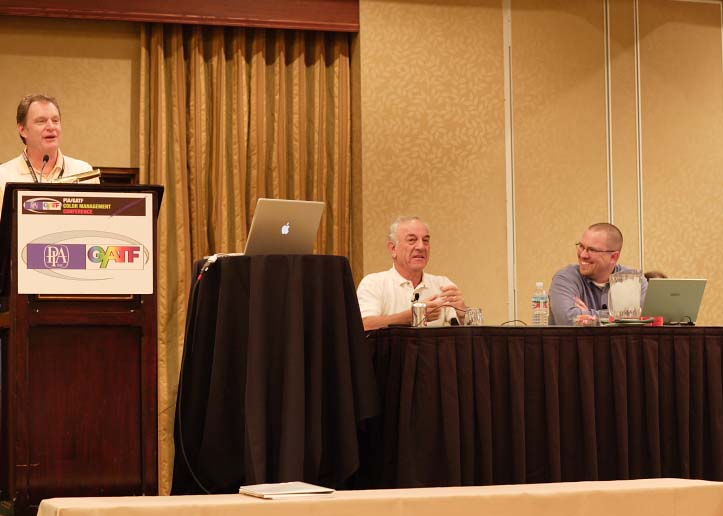
The above is a photo demonstrating peaceful coexistence at the PIA/GATF conference of the Tiger and the Borg. This session had Roger Siminoff of Apple (seated left) and Tim Grey of the Borg (right) talking about their companies color management policies.
Roger informed us that "Steve Jobs is a genius", and that Apple has long been conscious of the importance of color management, and as an example are pushing remote proofing or paperless proofing, which they consider an important market.
Tim showed how Microsoft is overtaking the ICC model with Vista's WCS (Windows Color System), and Tim added "Bill Gates is a genius too".
The consensus seems to be that WCS has considerable technical merits, and is a step forward from the present ICC practises. Tim indicated all design documents for WCS are available to developers under NDA, and will be made public when Vista is released. And that the reason why the ICC had not been approached with this stuff was that it was felt to be too slow.
Still, this session went down badly with a number of questioners, all of whom, like this author, were concerned about the interoperability of WCS with non-windows platforms. Tim Grey's short answer was "if you don't want it you don't have to use WCS, you can keep on using ICC instead in Vista"!
Interestingly, some Xrite employees seemed unhappy about the quantity of information filtering down from Billsville, while the Gretag crowd seemed happy with everything about WCS to the extent that they even bought this Borg-averse journalist an excellent prime rib dinner.
Friday, December 02, 2005
IO and Profile Maker Pro 5.05 for Windows - update

A little bird tells me that a first production batch of robot IO clones are ready to go out into the world and measure. They were ready and waiting, all they needed to face a life of precise servitude with Swiss serenity was software that has now been gifted them: Profile Maker Pro 5.05 for Windows can be found on the Gretag Macbeth site .
This update is supposed to be able to drive both Gretag's own IO and Xrite's DTP70. It is also supposed to incorporate a significantly improved Gamut Mapping in the profiling engine. All of which makes it a recommended update as far as I'm concerned.
You know how much I love my DTP70, I just hope PMP 5.05 can acquire data from this instrument in spectral mode, it would seem the current version only reads the LAB values. And yes, inquiring minds want to know whose dog ate the homework —excuse me— the Mac version of PMP 5.05 ?
Thursday, December 01, 2005
My own test shots.
Nobody is sending me interesting files so I've started making my own. Here is the first one, showing the setup testshot and then and then the hand-tuned version. I find the profiling tools give me accurate color easily, pleasing color not in this case.
Of course, profiling technology does have its uses for on-screen viewing and printing of the colors in this image.
I'll post the profiled images soon.


I have the peppers sitting next to me in the light used to make the picture above, and they match the CG210 pretty well. I think I'll dig out a spectro tomorrow and measure the peppers, It's an interesting variation of the usual print/screen matching game
I've also tried previewing this image using profilesfor my Epson 2100 printer, and it looks hopeless on matte, but will probably print decently on glossy. The background and eges are what gets hits hardest.
Edmund
Of course, profiling technology does have its uses for on-screen viewing and printing of the colors in this image.
I'll post the profiled images soon.


I have the peppers sitting next to me in the light used to make the picture above, and they match the CG210 pretty well. I think I'll dig out a spectro tomorrow and measure the peppers, It's an interesting variation of the usual print/screen matching game
I've also tried previewing this image using profilesfor my Epson 2100 printer, and it looks hopeless on matte, but will probably print decently on glossy. The background and eges are what gets hits hardest.
Edmund
Monday, November 28, 2005
First Camera Profiling Results: Ron Donson
Photographer Ron Donson has graciously allowed me to post images from his profiling experiment. Here they are. Decide for yourselves which sandwich you prefer. Both images are copies of the same file, one was left in AdobeRGB, the other had a profile I made for Ron assigned. Both images were then levelled out identically (by numbers) resized and converted to sRGB with relative intent, and posted.
Please copy-paste the following links for downloads. Tabs are neat for flicking back and forth between the two images.
http://canon1d.com/Pix/tomatoa.jpg
http://canon1d.com/Pix/tomatob.jpg
I'll let you vote in the comments for which you prefer.
Edmund
Please copy-paste the following links for downloads. Tabs are neat for flicking back and forth between the two images.
http://canon1d.com/Pix/tomatoa.jpg
http://canon1d.com/Pix/tomatob.jpg
I'll let you vote in the comments for which you prefer.
Edmund
Sunday, November 27, 2005
The Camera Profiling Experiment Rules
I've started to attract a lot of visitors interested by my offer of free camera profiles. I'm not doing this out of the goodness of my heart, I'm doing it to gather experience in what works and what doesn't.
You send me a target, and a couple of photos created with the same lighting and settings. Preferably all of the above are in-camera Jpegs, otherwise identical Raw conversions. No photos that allow me to evaluate the work means no profiles.
If you send me in-camera Jpegs, that means 2 files (One chart, one sample).
If you send me conversions, that means 4 files, preferably:(Converted chart, converted sample, Raw chart, Raw sample).
Large files can be easily sent via http://www.yousendit.com.
I'm summarizing the shooting guidelines below:
The target has to be very carefully lit, any gradient or colored reflection will damage the profile. One single softbox far away is good lighting, it can be masked or goboed to even it out. A mini colorchecker may have less lighting issues than the full-size one.
The target should not occupy the whole frame, to avoid vignetting prolems leading, again, to non-uniform lighting. It should not be cropped, I want to see the cardboard frame at the very least. If possible it should be mounted on some grey background.
Yes, lighting is crucial. The method I know off I learnt from the Coloreyes software - a respected profiling tool - which recommends ONE single softbox, slightly to one side, as far away from the chart as possible, feathered or goboed to make the illumination constant. An additional precaution is to move the card holder away from the back wall, in fact keep it away from every wall because of reflections, and also pay great attention to reflections on the camera. One thing I might do in the future is recommend two shots of a rotated target and create software to help me average out those shots.
TESTING: "The camera should be custom gray-balanced using whatever tools you usually employ for this. You can gray-balance in the Raw converter by clicking on your preferred target square."
The workflow must be locked down. Fixed conversionparameters, or in-camera Jpegs, please. The camera should be custom grey-balanced. And, if possible, the Lab value of the colorchecker white patch should be around 96, if this is the target you're using. You should almost be blowing out that patch, I think. Also, beware of lens vignetting ...
Canon's DPP is a very good converter to attempt this with.
When you get the profile emailed back, you simply assign it to your images in Photoshop.
You can send files to the address at the top of the blog. However, I will expect feedback as a condition of making the profile. A couple of additional images taken with the camera in similar lighting, sent with the target file are one of the requested peices of feedback.
Edmund
You send me a target, and a couple of photos created with the same lighting and settings. Preferably all of the above are in-camera Jpegs, otherwise identical Raw conversions. No photos that allow me to evaluate the work means no profiles.
If you send me in-camera Jpegs, that means 2 files (One chart, one sample).
If you send me conversions, that means 4 files, preferably:(Converted chart, converted sample, Raw chart, Raw sample).
Large files can be easily sent via http://www.yousendit.com.
I'm summarizing the shooting guidelines below:
The target has to be very carefully lit, any gradient or colored reflection will damage the profile. One single softbox far away is good lighting, it can be masked or goboed to even it out. A mini colorchecker may have less lighting issues than the full-size one.
The target should not occupy the whole frame, to avoid vignetting prolems leading, again, to non-uniform lighting. It should not be cropped, I want to see the cardboard frame at the very least. If possible it should be mounted on some grey background.
Yes, lighting is crucial. The method I know off I learnt from the Coloreyes software - a respected profiling tool - which recommends ONE single softbox, slightly to one side, as far away from the chart as possible, feathered or goboed to make the illumination constant. An additional precaution is to move the card holder away from the back wall, in fact keep it away from every wall because of reflections, and also pay great attention to reflections on the camera. One thing I might do in the future is recommend two shots of a rotated target and create software to help me average out those shots.
TESTING: "The camera should be custom gray-balanced using whatever tools you usually employ for this. You can gray-balance in the Raw converter by clicking on your preferred target square."
The workflow must be locked down. Fixed conversionparameters, or in-camera Jpegs, please. The camera should be custom grey-balanced. And, if possible, the Lab value of the colorchecker white patch should be around 96, if this is the target you're using. You should almost be blowing out that patch, I think. Also, beware of lens vignetting ...
Canon's DPP is a very good converter to attempt this with.
When you get the profile emailed back, you simply assign it to your images in Photoshop.
You can send files to the address at the top of the blog. However, I will expect feedback as a condition of making the profile. A couple of additional images taken with the camera in similar lighting, sent with the target file are one of the requested peices of feedback.
Edmund
Saturday, November 26, 2005
Color Management Books
I just received Andrew Rodney's new book, Color Management for Photographers, and Abhay Sharma's Understanding Color Management. Reviews will go up shortly, but here is the sneak preview:
Andrew Rodney's text shines as a howto book. It is simpler and more complete as a tutorial text than Real World Color Management. It'll teach you what a color-managed workflow is, why you want one, and how to get the job done with the main tools on the market. There's even a set of work-through exercises, and a very useful CD with a lot of demo software, sample images and other useful goodies.
Abhay Sharma's textbook explains all the color-geek stuff in terms simple enough to understand. This is where you'll find a clear definition of all that quaint terminology, like "tristimulus", and the background on colorspace conversion formulae . Dr. Sharma also provides information on how profiling software is architectured, and the actual contents of an ICC profile file, again in terms simple enough to understand.
Capsule summary: Both books are excellent, while very different. Professional and amateur photographers as well as users of color management technology in industry won't regret buying Andrew Rodney's book. Readers wanting to understand the concepts underlying CMS software and practice will find in Abhay Sharma's text an excellent introduction to the science behind the technology.
Dr. Edmund Ronald
Andrew Rodney's text shines as a howto book. It is simpler and more complete as a tutorial text than Real World Color Management. It'll teach you what a color-managed workflow is, why you want one, and how to get the job done with the main tools on the market. There's even a set of work-through exercises, and a very useful CD with a lot of demo software, sample images and other useful goodies.
Abhay Sharma's textbook explains all the color-geek stuff in terms simple enough to understand. This is where you'll find a clear definition of all that quaint terminology, like "tristimulus", and the background on colorspace conversion formulae . Dr. Sharma also provides information on how profiling software is architectured, and the actual contents of an ICC profile file, again in terms simple enough to understand.
Capsule summary: Both books are excellent, while very different. Professional and amateur photographers as well as users of color management technology in industry won't regret buying Andrew Rodney's book. Readers wanting to understand the concepts underlying CMS software and practice will find in Abhay Sharma's text an excellent introduction to the science behind the technology.
Dr. Edmund Ronald
DTP70 Bill Atkinson targets
The DTP70/Profiler combination is pleasing me more every time I use it. Bill Atkinson is well known for his Epson widebody profiles. He tells me he likes the DTP70 too, and he's made some targets for it, including one huge strip for wide-body printers, that the spectro reads ingests in one gulp. To make the strip feed in straight Bill has constructed an input tray for the spectro. You can find the Atkinson targets for the DTP70 here and a picture of Bill's setup at this site.
Saturday, November 12, 2005
Xrite's DTP70 and i1Match software play nice together
I've tried using theXrite DTP70 as a measuring instrument for Gretag's i1Match. It works.
I have an old i1 Rev A spectro, and the associated i1Match v3.0 software. Xrite supplies a very nice free, undongled app called ColorPort, which allows you to define targets and read them in.
So I read in the Gretag TC9.18 reference file, made myself a two-page A4 target for the DTP70, opened the Tiff files in Photoshop and printed them close to the edge, and read the targets into ColorPort with the DTP70. Then I exported the measurements from ColorPort into a CGATS file.
Finally, I connected the i1 Spectro (it's the i1Match dongle), read the CGATS file into i1Match, and made a profile. Bingo!
Compliments to Gretag and Xrite for behaving like adults and supporting industry-standard data formats !
I assume that PMP will be able to read the same CGATS files as i1, so one can doubtless use PMP as a backend for the DTP70. Neat !
I have an old i1 Rev A spectro, and the associated i1Match v3.0 software. Xrite supplies a very nice free, undongled app called ColorPort, which allows you to define targets and read them in.
So I read in the Gretag TC9.18 reference file, made myself a two-page A4 target for the DTP70, opened the Tiff files in Photoshop and printed them close to the edge, and read the targets into ColorPort with the DTP70. Then I exported the measurements from ColorPort into a CGATS file.
Finally, I connected the i1 Spectro (it's the i1Match dongle), read the CGATS file into i1Match, and made a profile. Bingo!
Compliments to Gretag and Xrite for behaving like adults and supporting industry-standard data formats !
I assume that PMP will be able to read the same CGATS files as i1, so one can doubtless use PMP as a backend for the DTP70. Neat !
DTP70 and Monaco Profiler 4.8 Review 'official" full text.
Xrite sells an automated print profiling solution, a bundle containing the Xrite DTP70 and Monaco Profiler 4.8. This is based on the DTP 70 spectro, which I started testing two weeks ago. It's been a very pleasant experience.
Until I started working with this Xrite combo, I didn't know printer profiling could be so simple. I was up and running in less than 30 minutes after unpacking the product, and inkjet profiles now take me less than 10 minutes to create.
The DTP70 is a fast compact device that acts like an inkjet printer in reverse: It ingests printed testcharts and scans them. Like an inkjet, it connects to your computer by a USB cable, and takes up little real estate. The only control on the device is the large button — you press this to tell the spectro to start scanning the chart you inserted.
The chart-scanning process requires only a couple of minutes per page. Yes, it's lightning fast!
The spectro hardware has both white and black backing strips for measuring. You can choose which to use by flipping the backing plate. Also, a UV filter can be manually rotated in and out of the measurement path at will—this is a very sensible design, as only some users and some software packages will need the filter. For the record, my position is that photographers who make client prints should not use the filter, while printers who make proofs should.
The Monaco Profiler Platinum software that Xrite supplies to drive the DTP70 has a comprehensive range of color management abilities. It can create scanner and camera profiles, calibrate monitors, create RGB and CMYK printer profiles, and edit ICC profiles. So far I've only exercised the printer profiling part of the package.
Installation of Monaco Profiler on my Powerbook under Panther was a breeze. The software can run anywhere, provided you plug in the dongle. My dongle got programmed remotely by the Xrite Web site during a registration procedure launched during installation. When installing on "fanjet", my noisy dual G5 with Mac OS X Tiger, I had a minor glitch as the HASP dongle driver didn't install automatically. As for Windows, the install on a Win XP machine at Canon's offices (see below) went through flawlessly.
I first profiled my home Epson 2100 inkjet, with two glossy papers and one matte paper, in RGB mode. For this, I used the half-page test chart, the simplest supplied by Monaco Profiler. I verified profile quality visually by means of a print of the Colorchecker template downloaded from Danny Pascale's site, updated with some of my own measured patch data. I also ran off the Pixl test image before printing some of my own portofolio.
When I was quite certain that my homemade inkjet profiles were good, I put the DTP70 in a plastic shopping bag and took it to visit Mr. Mariane, at Canon's headquarters in Paris. Together, we profiled a wide-body Canon inkjet, and a monster RIP-driven Canon laser-printer/copier that costs several hundred thousand dollars.
The copier yielded excellent color-accurate results for the Colorchecker, both in RGB and in CMYK mode, and made visually appealing photo prints, when our Xrite-generated profiles were used. However, to obtain optimal color from such an unstable device, the printer's self-calibration procedure should be invoked to re-linearize, before a print run and before profiling; also, color-sensitive prints should be run off as multiple copies, and the first few pages of each batch of prints should be disregarded.
No product is perfect. However the only weakness I found so far with the DTP70 is that the paper lead-in of a test chart needs to measure close to 30mm or else the paper mechanism will refuse to feed in. This makes it necessary to trim the charts by hand, precisely. But the Print with Preview dialog in Photoshop lets me print charts at exactly the right distance from the paper edge, on A4 sheets, and then the feed mechanism performs very reliably with no need for manual trimming of the page.
Capsule summary: The DTP70 and Monaco Profiler profiling combo is unproblematic to use and lightning fast. This industrial-strength profiling system is perfect for a production environment such as a repro-center or print-room.
I wish to thank Danny Pascale, the author of the Babelcolor color measuring and conversion software, Steve Upton, padrone of Chromix and author of the Colorthink profile evaluation tool, and color specialist Roger Breton for their invaluable assistance while I was struggling with ICC Color Theory 101 during this review.
Until I started working with this Xrite combo, I didn't know printer profiling could be so simple. I was up and running in less than 30 minutes after unpacking the product, and inkjet profiles now take me less than 10 minutes to create.
The DTP70 is a fast compact device that acts like an inkjet printer in reverse: It ingests printed testcharts and scans them. Like an inkjet, it connects to your computer by a USB cable, and takes up little real estate. The only control on the device is the large button — you press this to tell the spectro to start scanning the chart you inserted.
The chart-scanning process requires only a couple of minutes per page. Yes, it's lightning fast!
The spectro hardware has both white and black backing strips for measuring. You can choose which to use by flipping the backing plate. Also, a UV filter can be manually rotated in and out of the measurement path at will—this is a very sensible design, as only some users and some software packages will need the filter. For the record, my position is that photographers who make client prints should not use the filter, while printers who make proofs should.
The Monaco Profiler Platinum software that Xrite supplies to drive the DTP70 has a comprehensive range of color management abilities. It can create scanner and camera profiles, calibrate monitors, create RGB and CMYK printer profiles, and edit ICC profiles. So far I've only exercised the printer profiling part of the package.
Installation of Monaco Profiler on my Powerbook under Panther was a breeze. The software can run anywhere, provided you plug in the dongle. My dongle got programmed remotely by the Xrite Web site during a registration procedure launched during installation. When installing on "fanjet", my noisy dual G5 with Mac OS X Tiger, I had a minor glitch as the HASP dongle driver didn't install automatically. As for Windows, the install on a Win XP machine at Canon's offices (see below) went through flawlessly.
I first profiled my home Epson 2100 inkjet, with two glossy papers and one matte paper, in RGB mode. For this, I used the half-page test chart, the simplest supplied by Monaco Profiler. I verified profile quality visually by means of a print of the Colorchecker template downloaded from Danny Pascale's site, updated with some of my own measured patch data. I also ran off the Pixl test image before printing some of my own portofolio.
When I was quite certain that my homemade inkjet profiles were good, I put the DTP70 in a plastic shopping bag and took it to visit Mr. Mariane, at Canon's headquarters in Paris. Together, we profiled a wide-body Canon inkjet, and a monster RIP-driven Canon laser-printer/copier that costs several hundred thousand dollars.
The copier yielded excellent color-accurate results for the Colorchecker, both in RGB and in CMYK mode, and made visually appealing photo prints, when our Xrite-generated profiles were used. However, to obtain optimal color from such an unstable device, the printer's self-calibration procedure should be invoked to re-linearize, before a print run and before profiling; also, color-sensitive prints should be run off as multiple copies, and the first few pages of each batch of prints should be disregarded.
No product is perfect. However the only weakness I found so far with the DTP70 is that the paper lead-in of a test chart needs to measure close to 30mm or else the paper mechanism will refuse to feed in. This makes it necessary to trim the charts by hand, precisely. But the Print with Preview dialog in Photoshop lets me print charts at exactly the right distance from the paper edge, on A4 sheets, and then the feed mechanism performs very reliably with no need for manual trimming of the page.
Capsule summary: The DTP70 and Monaco Profiler profiling combo is unproblematic to use and lightning fast. This industrial-strength profiling system is perfect for a production environment such as a repro-center or print-room.
I wish to thank Danny Pascale, the author of the Babelcolor color measuring and conversion software, Steve Upton, padrone of Chromix and author of the Colorthink profile evaluation tool, and color specialist Roger Breton for their invaluable assistance while I was struggling with ICC Color Theory 101 during this review.
Friday, November 04, 2005
DTP70 Review is up on Publish.com
Click here for my "official" Publish.com review of the DTP70!
I'm now going to shift my focus to the rest of the Monaco Profiler Platinum software, and also look at profile Editing.
I like the profiles I got with the small chart. Skin tones look ok on my Epson. No point in moving to the bigger charts IMHO. But I'm looking for a way to improve the linearization of the devices I'm using eg. cheap inkjets.
One of the big advantages of a fast profiling device is that you can easily experiment with the driver settings, in order to improve the final image.
I'm now going to shift my focus to the rest of the Monaco Profiler Platinum software, and also look at profile Editing.
I like the profiles I got with the small chart. Skin tones look ok on my Epson. No point in moving to the bigger charts IMHO. But I'm looking for a way to improve the linearization of the devices I'm using eg. cheap inkjets.
One of the big advantages of a fast profiling device is that you can easily experiment with the driver settings, in order to improve the final image.
Saturday, October 29, 2005
Five-minute profiling with the DTP70
Apart from some tiny irritations listed below, Monaco Profiler has speeded up considerably after I installed it on my G5. I now need just about 5 minutes to make an inkjet profile with the half-page chart, and that time spans both measuring and computing the profile. I now feel that I've got this system sussed - it's time to do some real printing rather than just Colorcheckers and standard test pages to check out the profiles. I've been printing some portraits of a friend's son on Epson Premium Glossy, not at all recommended or supported on the Epson 2100. My most important criterion is skin texture, and the kid's skin tone looks ok on the prints.
I had a phone discussion with Steve Upton of Chromix yesterday, and he makes his inkjet profiles with at least a thousand patches on his slow Gretag Spectrolino/Spectroscan systems. I'm not sure that's necessarily a good thing, though - when I was younger I did a lot of neural net training and I learnt that when you use too many data points for training a net you can get overfitting. Once I've written the first Publish.com article about the hardware, I'll start to play around with changing parameters in the software, and test profile quality with large and small charts, dense cubes and sparse cubes.
Detailed DTP70 lab journal.:I installed Monaco Profiler on my G5 dual 2.5 with Tiger today - the computer I call "Fanjet". I encountered some minor software issues which I hadn't seen on the Powerbook under Panther. Profiler wasn't seeing the dongle. I found the dongle installer in a directory, installed it and everything started working properly. It seems that the dongle driver didn't install by default ! Also, there's some strange interaction between Monaco's screen profiling reminder and my screens, carefully profiled and matched with ColorEyes, are having their assigned profiles ignored at reboot. So I have to go into Display Preferences and reset the screen profiles to the ones I want. More entertainingly, the Xrite mail system has apparently blacklisted gmail, so I can't send those nice people mail easily and report these small glitches.
Oh, and by the way, I found my old Colorchecker under some socks, and it doesn't quite match the new one.
I had a phone discussion with Steve Upton of Chromix yesterday, and he makes his inkjet profiles with at least a thousand patches on his slow Gretag Spectrolino/Spectroscan systems. I'm not sure that's necessarily a good thing, though - when I was younger I did a lot of neural net training and I learnt that when you use too many data points for training a net you can get overfitting. Once I've written the first Publish.com article about the hardware, I'll start to play around with changing parameters in the software, and test profile quality with large and small charts, dense cubes and sparse cubes.
Detailed DTP70 lab journal.:I installed Monaco Profiler on my G5 dual 2.5 with Tiger today - the computer I call "Fanjet". I encountered some minor software issues which I hadn't seen on the Powerbook under Panther. Profiler wasn't seeing the dongle. I found the dongle installer in a directory, installed it and everything started working properly. It seems that the dongle driver didn't install by default ! Also, there's some strange interaction between Monaco's screen profiling reminder and my screens, carefully profiled and matched with ColorEyes, are having their assigned profiles ignored at reboot. So I have to go into Display Preferences and reset the screen profiles to the ones I want. More entertainingly, the Xrite mail system has apparently blacklisted gmail, so I can't send those nice people mail easily and report these small glitches.
Oh, and by the way, I found my old Colorchecker under some socks, and it doesn't quite match the new one.
Thursday, October 27, 2005
DTP70 - a device for printing beautiful Colorcheckers !
Today I printed some beautiful Colorcheckers using that very first ICC profile I'd originally made within thirty minutes of unpacking the DTP70. On monday, I will give the DTP70 and Monaco Profiler a hard workout with a variety of printers, testing against GMB Profile Maker Pro with a fellow color geek in Paris. But I can already state that the first profile I made was very good; out-of-the-box experience excellent, and the profiling software is a breeze to use.
Regarding my earlier posts of problems: As I'd guessed, there was no problem with the profile. But printing the Colorchecker was real hard - for me. I had a lot of problems with neutrals going bluish etc. This was all my fault for not understanding the arcana of choosing a rendering when printing. I've taken a week to sort myself out. Even going to the extent of measuring the patches on my Colorcheker.
In the end I was told by the guys listed below to print with Absolute Colorimetric from a LAB-encoded Colorchecker file, and the result was beautiful !
I'd like to thank the color geeks on the colorsync list - especially Danny Pascale of Babelcolor fame, Steve Upton padrone of Chromix, and Roger Breton, for sorting this out for me.
Regarding my earlier posts of problems: As I'd guessed, there was no problem with the profile. But printing the Colorchecker was real hard - for me. I had a lot of problems with neutrals going bluish etc. This was all my fault for not understanding the arcana of choosing a rendering when printing. I've taken a week to sort myself out. Even going to the extent of measuring the patches on my Colorcheker.
In the end I was told by the guys listed below to print with Absolute Colorimetric from a LAB-encoded Colorchecker file, and the result was beautiful !
I'd like to thank the color geeks on the colorsync list - especially Danny Pascale of Babelcolor fame, Steve Upton padrone of Chromix, and Roger Breton, for sorting this out for me.
Saturday, October 22, 2005
Comparing colorcheckers
Yes the red patch on my new Colorchecker was off by 3 deltaEab compared with Danny Pascale's average. And yes, you can compare images by superposing them on 2 layers and blinking. And yes, I'm going to have to look at how I'm printing, because the printed versions have those 3 colours which are off by 7 or 8 deltaE.
In the mean time, I used the DTP 94 and Profiler to profile a friend's LCD screens. Monaco Profiler Software and DTP94 hardware are neat, easy to install and easy use. Software has a feature for measuring performance with definable patches, I think the Colorchecker colors are wired in - I should use this feature in future screen profile tests, crosschecking with the i1.
In the mean time, I used the DTP 94 and Profiler to profile a friend's LCD screens. Monaco Profiler Software and DTP94 hardware are neat, easy to install and easy use. Software has a feature for measuring performance with definable patches, I think the Colorchecker colors are wired in - I should use this feature in future screen profile tests, crosschecking with the i1.
How to make your own custom Colorchecker
The quick way to make your own ColorChecker is to start with a template eg. that from Danny Pascale's Babelcolor site. You go into i1 Share, and measure all the patches. Then you chhose Export and save out the data as either a Lab or AdobeRGB photoshop patch file, which you then read into Photoshop. Magic brush to select the patches from the template, then fill. Of course, if someone created a macro to do this it would be faster. If you want to do so, post a comment.
Inter-colorchecker, inter-instrument agreement and other issues
In this post I'm using Blogger as a lab journal.
The slight disparity of a few of the Colorchecker patches, between the original and the printed version is bugging me. Color geeks are perfectionists or they're nothing, and the bug has bit me too. The strange thing is, the match between paper types is very good, it's the match between my two profiled prints and the Colorchecker which diverges slightly.So I suspect that the only open part of the loop, the image data, might be bad.
So, l'll measure out my own Colorchecker. I will then update the image I got from DannyPascale's site with mty own data and reprint. Unfortunately, I cannot stuff the colorchecker into the DTP70, so I have to measure the chart with my EyeOne. This introduces the additional complication of inter-instrument agreement, which I will try to address in another set of measurements later by measuring some printed patches with both instruments.
The slight disparity of a few of the Colorchecker patches, between the original and the printed version is bugging me. Color geeks are perfectionists or they're nothing, and the bug has bit me too. The strange thing is, the match between paper types is very good, it's the match between my two profiled prints and the Colorchecker which diverges slightly.So I suspect that the only open part of the loop, the image data, might be bad.
So, l'll measure out my own Colorchecker. I will then update the image I got from DannyPascale's site with mty own data and reprint. Unfortunately, I cannot stuff the colorchecker into the DTP70, so I have to measure the chart with my EyeOne. This introduces the additional complication of inter-instrument agreement, which I will try to address in another set of measurements later by measuring some printed patches with both instruments.
Subscribe to:
Posts
(
Atom
)
