Sunday, March 18, 2007

Eizo CG - almost self-calibrating !

I like ColorEyes Display, and they support it well. It also has some nice features with presets files. I am a bit sceptical about the interface, though.

On the other hand, my demo has expired, and my main computer has crashed taking all the old versions with it. The ensuing panic was instructive - With Big Mac crashed, I needed to use my CG210 with the laptop,in a hurry.

The quickest way to get my Eizo set up with the Coloreyes-profiled
MacBook (with an inoperative demo copy of CE) while I was in panic
mode was to just press the front panel buttons to switch the CG210
into 5000K 1.8 mode.

Which leads me to wonder whether as the Eizos already have a USB port, they couldn't be programmed to accurately recalibrate their 5000/1.8 and 6500/2.2 presets with a puck ?

Just one more chip to add, and we need NO MORE SOFTWARE.

You heard that here first :)

Edmund

Tuesday, March 13, 2007

M8 Broken - M8 Refurbs.

Over the past few weeks, I've started distributing various camera profiles for the Leica M8, which is the new digital successor to the Leica M rangefinder. The M8 is light, compact, has sharp Leica lenses and first-class image quality. The Leica M8 is addictive; unfortunately mine just broke.

Sunday,
by means of money and alcohol, I inveigled a friend, to act as an extra around Montmartre. When we got up there, the M8 was inert. I got it to wake by oepning, popping the battery, and re-attaching the back with the power switch on, but the back controls and rear screen of the M8 remained inert.

I limped through the session with no chimping at ISO 160, keeping the camera awake with my finger on the shutter button; I learned that one after it went into a coma again. Now the camera is going back to Solms. I'm going to recommend to Leica that they give dealers loaners so that customers have some fallback.

Talking of Leicas, I have some news: Refurbs have been seen delivered to some dealers. These will be sold at a substantial discounts. The warranty card of the refurbs is marked with a red spot on the bottom right.

Edmund

Thursday, March 08, 2007

Microsoft enters HD in Photo in Image Format race

Microsoft has just entered a horse in the Image Format Derby as you can read here and here.

I was expecting this, as I stated in one of my previous blog entries about DNG:

"Of course, it is to be expected that Microsoft, who recently acquired iView Media Pro will gatecrash at least the ground floor -consumer use of Raw - of this party when it gets big enough to warrant a landgrab. The PC has become the digital image shoebox, and even Bill Gates has kid pix to save these days."

At this point it's not yet quite clear to me whether HD Photo is a Raw format like DNG or a "cooked" format like Jpeg, but it is certainly aimed at the digital image shoebox.

Adobe themselves helped Microsoft, we are told, in writing their HD Photo plugin for Photoshop
! Well, I guess that owning both the racecourse and the committee, and having the favorite slow down to let you pass, helps your nag win the race.


Tuesday, February 27, 2007

Raw: The Adobe way, the Microsoft way and the Open way.

Photographers are reluctant hostages to proprietary Raw formats. Many have become vocal about this uncomfortable position as you can read on the OpenRaw site. In this over-long column I analyze the positions taken by Adobe and Microsoft vis à vis Raw, and indicate one Open way out of the Raw maze.

While I believe the industry, will continue to resist the imposition of any unique Raw format, I can suggest at least one method by which the current lock-in could easily be circumvented by the OpenRaw community. It involves copying Adobe's strategy by means of a free Raw converter called dcraw, and is detailed towards the end of this column.

With the Raw format there seem to be three ways the format inflation can be subdued: The Adobe way, the Microsoft way and the Open way. Let's look at all three.

Adobe's strategy is focused on ensuring that all the core technology for Adobe products be sourced in-house, and runs on all platforms equally well. Adobe has Thomas Knoll's innovative and proprietary ACR-based Raw conversion technology powering Photoshop's ACR Raw plugin.

I believe that all the technical gruntwork to incorporate the Raw format for a new camera format in ACR is done by Adobe. So since DNG has failed to be adopted by the market they have been forced to write I/O and decoding routines for a zillion different formats.

All this hard work has brought positive results for both Adobe and the end user: The resulting intellectual property is fully owned and maintained by Adobe. As a result, the quality of the code and the images it generates can be tuned by Adobe to their usual high standards across formats, bugs get fixed directly by Adobe, and the codebase can be updated and reused at will in Adobe's new products such as Lightroom.

Microsoft's strategy is focused on supporting very diverse hardware cheaply, and well. They achieve this by devolving responsibility to hardware makers: Each vendor supplies a basic decoding plugin for their format. This is similar to the printer market where each company supplies a driver disk which remains the third party vendor's responsibility.

Because the plugins are written directly by the camera makers, adding a new camera to the plugin library means zero additional effort for Microsoft — a significant advantage of this approach. Also, Microsoft does little maintenance work on the plugins.

But the Microsoft way also benefits the consumer: All third-party application programs running under Windows gain the ability to read Raw files, just as they gain the ability to print on any installed printer. The quality of the files is potentially very high because the camera makers can and will leverage all their proprietary technology into their drivers.

Alas, With both Microsoft and Adobe the customer's files are hostage to proprietary strategies.

In the case of Microsoft, the technology to read a format remains mediated by the binaries supplied by the camera makers, even though third party applications gain access to the plugin. This is not Microsoft's fault, but it does make the files hostage to the existence of the drivers.

In the case of Adobe, the proprietary ACR technology for the rendering of Raw is procedurally embedded in the ACR converter itself, and though the DNG file format is public the ACR source code is one of the company's closely guarded secrets So third party applications can decode the settings but not reproduce their effect.

So both camps are neither open nor future proof. If in the future a photographer cannot run the ACR software, or if the Windows plugins stop working, be it for licensing reasons or obsolescence, that photographer loses out.

Indeed, today already Adobe customers must regularly license new PS updates because old versions of ACR cannot read new camera formats.

Surely, there must be many open alternatives to these two approaches ? Let me suggest one avenue below:

David Coffin has written and maintains a GPL'ed Raw decoder called dcraw that can read just about anything. As he puts it: "Here is my mission: Write and maintain an ANSI C program that decodes any raw image from any digital camera on any computer running any operating system."

Dcraw is short (about 7000lines at present), portable and yields decent files. Indeed dcraw has been used extensively in both commercial and open-source graphics software. I can certify that dcraw provides decent, if not stellar, image quality.

I suggest the Open Source community and maybe even the OpenRaw guys write or commission dcraw plugins for Microsoft Windows and Adobe's software, so that dcraw becomes an additional input module to all existing and future software, thereby future-proofing it. In effect, dcraw would become the ACR of the open source community.

Some lobbying, as the OpenRaw movement could easily supply, would ensure that both large firms offer at least token cooperation for such an initiative, such that plugin SDKs would be made available. Technical competence to actually do the necessary programming is sufficiently available in the open-source movement.

Existing packages would then be forward compatible, as long as the dcraw code is maintained for their platforms by the open source community. A lifeboat may not offer the conveniences of an ocean liner, but it sure makes you feel better by just being there !

Edmund

Monday, February 26, 2007

Spectro football and other games

What is your spectro really worth after the delivery guy has played football with it ?

Well, what you ordered may cost $3K, easily, if it's a chart reader. But if the guy has drop-kicked or caber-tossed it, it's probably worth zilch. Niente, nada, überhaupt nichts.

Because you don't know how accurate it is anymore.

Spectros are valuable pieces of equipment. Valuable by their calibration. What you're paying for is not the price or the materials, it's the guarantee of accuracy.


Now, I have no doubt that the instruments which Xrite, Barbieri or Minolta make are carefully calibrated at the factory. But are they still so precise when the client gets them ? Are they still precise after a year's worth of daily knocks ?

I just got an iSis XL spectro which got seriously roughed up by the UPS guy. I know it suffered: When it made dreadful profiles I looked inside and found the head cover had sprung open. I'm sure other buyers had similar experiences with their shipments.

So, I'm floating an idea: Why not deliver some physical calibration reference with every instrument ? Then whenever the urge strikes him the user could check whether the device is operating within acceptable tolerances.

Such a reference-bound diagnostic check would not only save the users worry. It would also save manufacturers headaches: Because only genuinely broken instruments would get sent back - I'd bet that nowadays quite a few service calls are really caused by user-error rather than hardware failure.

Edmund

Friday, February 23, 2007

Adobe Lightroom - a lucrative surrender

The Raw format has gone fully mainstream, as proven by Adobe's launching Lightroom, a package entirely dedicated to filing and non-destructive editing of Raw files.

Lightroom is a surrender, on favorable terms, a retreat with honor. It signals the failure of Adobe's attempt to
impose a unified digital negative (DNG) and thereby commoditize the digital SLR camera.

This attempt at hegemony of the Pro and Prosumer imagery market sems to have failed at least for the time being. The SLR camera market is now owned by Canon, Nkon and Sony, and none of these seems to be in a hurry to kowtow to Adobe. Of course, matters may still change if customers demand Raw in the consumer market, but at that point Microsoft would be in a better position to embrace, extend and profit than Adobe.


In launching Lightroom, Adobe has come late to the party inaugurated by Apple' Aperture, but Adobe seems to have replaced Apple's arrogance with an ear for the customer's wishes, and probably has a bestseller on its hand.

Of course, it is to be expected that Microsoft, who recently acquired iView Media Pro will gatecrash at least the ground floor -consumer use of Raw - of this party when it gets big enough to warrant a landgrab. The PC has become the digital image shoebox, and even Bill Gates has kid pix to save these days.

I will not be discussing color management in Lightroom here, due to a momentarily lukewarm relationship with Adobe PR who see no reason to send me a copy. However, Andrew Rodney discusses the color model for Raw in a very knowledgable article.

Edmund

Thursday, February 22, 2007

The King (DTP70) is dead, Long live Queen iSis !

The DTP70 is retiring.

Quite a few people have discovered, just now, via the Colorsync list, that the DTP70 is headed for the Smithsonian. Indeed, my friends, I heard it announced in Regensdorf, the one and only DTP70, our beloved DTP70, flagship of the Xrite chartreaders, is being pensioned off .

It's just economics. There has been a takeover of Gretag by Xrite - or is it a takeover by Gretag of Xrite, I do get confused; anyway, it has been decided that the graphics products shall be mainly organized around the true and proven EyeOne technology. Invented and proven by Gretag.

Thus, simplification of the product line of the combined company explains the prior exit of Pulse -replaced by EyeOne Pro, the demise of Optix - displaced by EyeOne Display, and the redundancy of the DTP70 now that iSis is reaching the market.

But what then of the clients who invested in the DTP70 and Monaco Profiler, and who are now muttering rumors in the bazaar ? Let us be sure that Xrite will support them - anything else would be suicidal in this small market.

And software updates? Well, I have been assured that the fans of Monaco Profiler will find their favorite engine and renderings carefully preserved in a forthcoming combined offering. And of course the PMP rocket pilots will get their engine updated too.The guys and gals in Regensdorf know their surest money comes from the installed base, and don't want to offend either one of their client pools.

Which brings us back to the hardware. The replacement for our old and faithful DTP70 is the brand new iSis. The DTP70 was a tried and tested design with an incandescent illuminant , filter technology and an optical UV filter. The iSis is a modern design which incorporates EyeOne diffraction-grating spectro technology, a solid state illuminant and a vision system that can read barcodes.

iSis will doubtless bring us Swiss precision and, we do hope, reliability. This is a conservative business, and I guess it takes at least a year for the pro users to feel really comfortable with any new technology, however good.

Now please excuse me, I need to go and check some profiles I've just made.

Edmund

Tuesday, February 20, 2007

Idiot-proof color pays off for HP

We've all been amazed by the rave reviews which the Z-series has been getting from the photo crowd. Are they really that good ? I think they're simply idiot-proof.

Methinks many of the "Gag me with a spoon !" Z-series fans are seeing the effects of seamless working CMS for the first time. Decent color, and painless. And no consultant involved, either. Please, Sir, may I have some more ?

HP has figured out that any custom-profiled printer with decent native drivers will always beat an unprofiled printer.

When the fight involves third party media the fight is even more unbalanced. But the photo crowd do so love their esoteric paper choices. And the channel loves them for their conspicuous consumption. A bartender does like his alcoholics.

Epson and Canon have good print quality, when somebody bothers to make a custom profile for them. Which involves spectros, and/or consultants and/or dongled software and other nasties.

Which is why Epson and Canon should be afraid for their market share — when the sh*t hits the fan - excuse me, when the product hits the market, usability wins over quality every time.

Wait and see.

Sunday, February 04, 2007

Speed is the new greed !

I guess a lot of graphics guys are impatiently waiting for the new Adobe Creative Suite to ship, not because of the new features, but because it'll run native on the Intel Macs. Native means faster !

We all know it's gonna happen soon because Photoshop CS3 is in beta, and Lightroom just shipped.

In fact, I bet Apple has some slick powerful new laptops they will bring out to crest the Adobe upgrade wave.

But I like to catch my waves early. I've already got the beta on the current surfboard-sized 17 inch MacBook Pro.

So I can tell you two things you need to know. Firstly, Photoshop 10 (or CS3) is really fast on the G5. And blazing fast on Intel. And second, the screens on the current MacBook Pro are no good for colormanagement.

To use tech-speak, the MacBook Pro matte screen has very high-directivity, that's why it's so bright. That's why every little move of your head makes those colors dance.

And then, the gamut is a joke. I cannot do my camera profiling work on this machine, the reds are so poor.

If Apple brings out a new laptop screen technology, go for it ! The present display is a bummer !

Wednesday, September 27, 2006

Optix, Pulse get the Swiss Kiss

The Optix screen calibrator and the Pulse spectro had their death warrants read out at the Xrite press conference at Photokina this afternoon, Tom Vacchiano presiding. They will live in memory, starting December. Both of these products were found guilty of minority market share when compared to their GMB counterparts, EyeOne and Eyeone Pro. Goodbye Optix, you were accurate, you will be missed.

Profile Maker Pro and Monaco Profiler will be marketed side by side for now, as they each enjoy market dominance in their geographic sectors. They will in due course be merged into a single software package embodying switchable rendering engines. The DTP-70 seems alive for now, but I wouldn't bet on its long-term survival once Isis invades the X-Y scanning spectro ecological niche.

On the positive hand, it looks like the Swiss team is now finalizing the reverse takeover of Xrite with efficiency and expediency. They will be integrating ex-Gretag's darling EyeOne spectro head technology in their own and third-party hardware every chance they get. The annnounced deal with HP for the Z-series Designjets with an integrated spectro might just be the tip of the iceberg - I can sense Epson sniffing round the edges. Moreover, whispers say they are developing a new product for the prosumer photo market. I don't enjoy seeing the Optix and Pulse hit the dust; but I can discern positive momentum building here - if I were an Xrite stockholder I'd feel bullish about hardware sales.

We'll leave the discussion of the side-effects of Windows Color System on the color software industry as an exercise to the reader, who will not forget to factor in Adobe's desire to offer an OS-agnostic platform for its graphics tools.

Tuesday, September 26, 2006


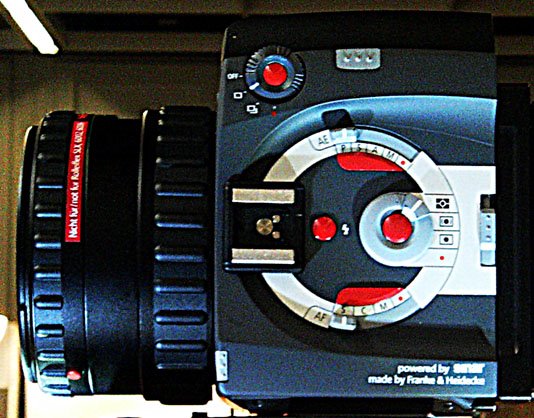
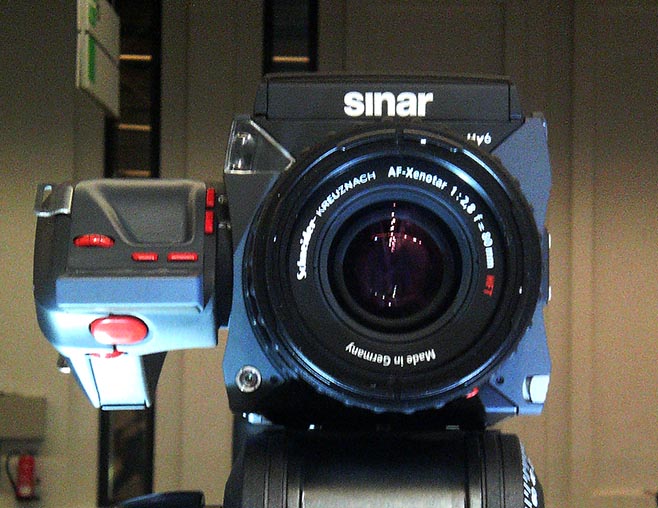
By popular demand, here is another picture of the Rollei/Sinar/Leaf camera prototype. I was told that currently the Sinar back does not rotate in place, but it can simply be taken off and replaced in the other orientation. Prices should be in range with the current 6008 offerings. I believe that there is a filmback. I will talk to Rollei again to try and get more photos and details to post here.

I'm now off to the Hasselblad press conference - please feel free to ask me to report on any topic which you deem of interest at Photokina.

Edmund

Rollei-Sinar-Aptus Full Frontalhttp://www.blogger.com/img/gl.link.gif


Here is a frontal view of the Rollei camera also marketed by Leaf and Sinar. The handle rotates. A side view of the same camera can be seen on my test blog.

Sunday, August 13, 2006

Review: Colour Engineering by Green and MacDonald

é
Phil Green and Lindsay MacDonald, Colour Engineering, Wiley.
Digital camera makers, printer manufacturers, image processing software authors and the whole of the printing and imaging content industry share a need for allowing color information to move seamlessly between acquisition, archiving and display. This desire for hardware-independent seamlesness is manifest in the creation of the International Color Consortium (ICC), and translates into the subtitle of the Green and Lindsay's book, " Achieving Device Independent Color".

The science of color is grounded in physics and psychology; however the practical use of color in capture, display and reproduction of imagery relies heavily on descriptive formalisms, measurement devices, computer software, and the quirks of today's capture and display hardware. This is technology, not science. And anyone wishing to write code to manipulate color information benefits from an overview of these details.

Green and MacDonald have edited a book composed of information-packed peer-reviewed survey chapters which taken together supply an overview and tutorial introduction of the implementation details of color technology, as it stood in 2002. Colour Engineering bridges the considerable gap between simplified texts such as Abhay Sharma's "Understanding Color Management" and current research.

A reader desiring to enter the field will find assembled here most of the technical background material needed in order to quickly use Matlab or another toolkit to manipulate color imagery and color transforms, and an invaluable chapter by chapter bibliography. Colour Engineering is an essential resource that should find itself on the bookshelf of every color scientist, hardware designer and color software author.

NB - this review is not yet finalized.

Friday, June 23, 2006

Eyeone Display video tutorial for clients


Most photographers I help with color are at remote locations. So I use the phone, Skype and email to interact with them, and above all, I try to recommend easy to use solutions.

With ease of use first in mind, I'm liking the Eyeone Display 2 package a lot these days. It's easy to buy, easy to use, and I can point clients at a very nice web video which explains what it's all about. Every Eyeone system buyer should watch the video.

There's another thing I like about the Eyeone, and that's the white ambient light shoe which acts as protection. I've an Eyeone in my travel bag, and don't want the sensor side damaged. Now, I did suggest to Gretag that they add a cheap pouch and sell it in a bubble pack, so that buyers would get the "buy it for the office, use it at home" idea, but as with most of my suggestions it fell on deaf ears. Hey folks, it was a suggestion, not a criticism !

Wednesday, June 21, 2006

Capture NX brings innovative edit tools

Nikon Capture NX is Nikon's latest entry in the Raw conversion turf battle, and it would appear to be a major step forward, innovating with a new local image editing paradigm called Control Points. Creative Pro has done a nice review.

Tuesday, June 20, 2006

Rumors of Basiccolor back-to-basics profilers.

A high-placed source at Basiccolor, speaking on condition of anonymity — yes Heidi, I wish I were a political journalist— indicates that two new streamlined products are being fueled up for launch from Penzberg.

One is an RGB print profiler that I believe is code-named Droprgb, the other a CMYK profiler named Cmykick.

These two packages do not drive instruments for acquisition— they expect a measurement file containing spectral data to be dropped on them. Apparently they don't require any configuration either - when a measurements files is dropped, a profile gets generated and written into the right places, as required by the host OS.

I guess someone over there in Penzberg with a doctorate in physics must have argued that the company's core competence is color and not interface design. Or maybe it was someone with sound business sense. In any case, I would agree - there is room for simple software in the CMS arena.


Sunday, June 18, 2006

Photoshop CS2 9.01 print bug: Revert to Original 9.0 Disks !


Reports on the Adobe forums, indicate that the 9.01 update of Photoshop CS2, when running on certain updates of Mac OS X 10.4 Tiger, is having serious color management issues when creating files for printing. Ian Lyons has posted an image of the bug and a workaround.

I would think that building profiles might also be problematic on any affected computer — profiles built with an affected configuration might well be worthless and need to be redone.

Printing from InDesign is also a solution. However,
I would suggest users revert Photoshop back to the original Photoshop 9.0 disk install, and upload the current Adobe Raw Converter if they need Raw capability. This should keep people out of trouble with any latter Apple update to Mac OS 10.4.x — even users with no present issue might have problems when they update the system.

This is surely just a temporary hiccup, and I expect Apple and Adobe will resolve it soon. Adobe's flagship application is renowned for its stability, especially when compared to software that comes out of Redmond. However, this is yet another indication that updates to production systems may be avoided, except when security mandates them.

Update: I got the following email from Bob Frost:
Edmund,

According to Adobe, it is a bug in OSX 10.4 (not in CS2) and they are waiting for Apple to fix it.

Bob Frost


Monday, June 12, 2006

Gutenprint versus native Epson driver gamut


TOP= GUTENPRINT.
Here are the gamuts, courtesy of the Gamut Warning in Photoshop. One can see the extended shadow range as well as the deficit in the reds.
BOTTOM= EPSON NATIVE DRIVER

Sunday, June 11, 2006

Gutenprint / Gimp-Print inkjet RIP review Part 1 — RGB

I have started to look at the Gimp-Print inkjet drivers (now called Gutenprint). In conjunction with other preinstalled components such as CUPS and Ghostscript, this open source system project forms a RIP system, supporting 8 and 16 bit RGB and CMYK files as well as PDF and Postscript, and it's present on every Mac, and can run on every Linux box.

Today, I'll just discuss my findings when using the beta Gutenprint V5.0 RC3 as an inkjet RGB driver for printing images from Photoshop.

Nutshell report: Very easy to install and very good results, on a par with the proprietary Epson RGB driver. However, it's painful to configure. Gutenprint's excellent functionality is obscured (read obfuscated) by an interface overloaded with undocumented options.

Equipment used: Epson 2400, connected to a Dual 2.5 Ghz PowerMac G5 printing on Epson archival matte. Profiling with XRITE DTP-70 spectro and Monaco Profiler 4.8, eyeball evaluation by using the Chromacity target, and male and female eyes.

Installation: On the Mac, an update installation of the latest GutenPrint is easy, via a package that can be downloaded from Sourceforge. Creation of a print queue is done via the Mac's Printer Setup app, and is well documented in a PDF supplied with the package. Gutenprint does as well here as the Epson driver.

Printer Configuration: On the Mac you set up the printer by pointing a browser at the CUPS web interface, located at
http://localhost:631 and there are zillions of incomprehensible parameters. Hint: Set the printer to Line Art if you are doing profiled printing with Photoshop working as the color engine. I'd say this is the only bad aspect of this driver.

Printing: You can print to your newly installed Gutenprint device from Photoshop via the usual Print with Preview dialog. Although the margins are different, everything ends up at the right place when you click the "Center Image" checkbox. Nothing new here - and that's exactly the way we want it.

Print Speed: On my Epson 2400, Gutenprint was slow. Not unusably slow but much much much slower than the Epson driver. Long pauses between passes. Maybe I need a USB 2.0 cable ?

Profile Quality: I profiled both Gutenprint and the proprietary driver with Monaco Profiler, using the simple 343 patch target that results in very smooth inkjet profiles. Looking at the target indicated Gutenprint has a better linearization out of the box. The gamut looked fairly similar to the Epson driver, except in the reds where there may be a bug. The Gutenprint gamut seemed better in the shadows.

Print Quality: Looking at the Chromaticity target, rendered perceptually.
  • -Neutrals were neutral, shadow gradients smooth.

  • - Gutenprint had better shadow detail.
  • - The Epson shows a smidge more contrast (due to the blocked shadows ?) and slightly more sharpness.
  • - Highlight definition of colored zones looks better with the Gutenprint driver.
  • - I'd say the reds are significantly better with Epson's driver.
  • - Examination with a loupe showed a weave/stripe pattern on the Gutenprint sample, while the Epson sample showed more random fill patterns. However this is not visible to the naked eye.
  • - The Colorchecker looked good on both samples, except - you guessed it- for the red patch. The red is better but not perfect as rendered by the Epson driver. But then, of course I printed with perceptual rendering.

Daylight/Indoors: Disparities between the samples seemed stronger in incandescent light. They matched more closely in daylight.

Suggested improvements: A minor quibble, there is a slight gamut issue with the reds on the 2400, at least on matte paper. I guess this is something that could be easily fixed by adjusting the linearization settings, but I don't know how to do it. Apart from that, to solve the zillion settings issue by giving people decent starting points, I suggest bundling some pre-configured settings into the install package, one of which would be a good-quality no-color-correction settings-set for the CMS crowd, and another for normal users wanting to print photos. I'd also recommend some sort of HTML documentation for the settings options. Apart from a very slight deficit of sharpness, I don't see much in the functionality that needs improving. Some tools for linearisation might be a useful adjunct however. Oh yes, and then there is the speed problem.

Summary: The Gutenprint RGB printer driver, when profiled, offers equivalent quality to Epson's printer driver. Indeed Gutenprint seems particularly well suited to portraits because of good shadow and highlight rendering. In the next part of this review we'll be looking at what Gutenprint can do that Epson's driver cannot - did you say CMYK and Postscript ?

Addendum: Yes, I will make custom profiles for this driver on request. Provided you already know how to use it.

Sunday, February 19, 2006

Darkness is your friend

This week, no news is good news: I'm gonna link to a digital photo episode of BOFH - the artist otherwise known as "Bastard Operator From Hell". Enjoy !